BP_InteractionHandler
The BP_InteractionHandler is what allows the player to interact with the world. Add this component to your character.
Note
A change in 4.24 caused *Bind Scan Root* to become a protected method, just double click the node and change the *Access Specifier* to public.

Setup
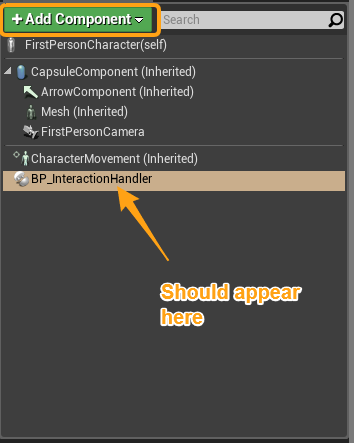
In your character blueprint, add the BP_InteractionHandler component.
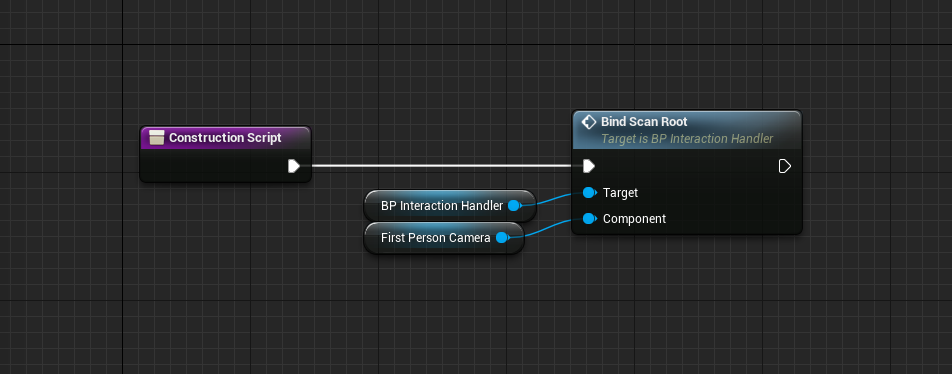
Then, inside of your construction script, call Bind Scan Root on your newly created Interaction Handler. The Component will be where the traces are run from, so this could be your camera or any other component.
Input
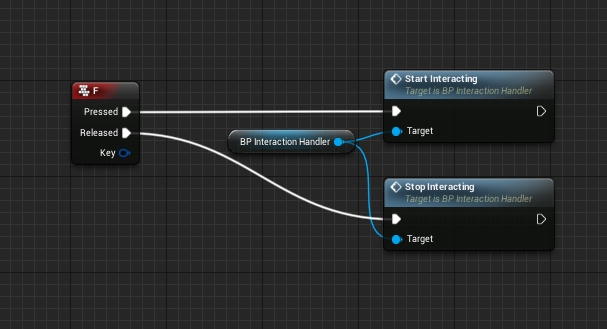
Now for input. The Handler has two functions for input, Start Interacting and Stop Interacting. The interacting should try to start on press, and stop on release. This isn’t a rule, but it should work for most situations.
Events
The Interaction Handler has a single event:
- On Target Changed
- Called when the player highlights a new interactive.
Interaction Handler Settings
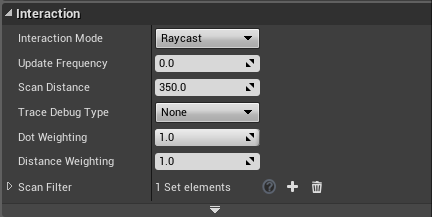
There are multiple settings to tweak to get your players interaction feeling right, but the defaults work well too.
- Interaction Mode
- How the interaction handler finds interactives can be either a line trace (Raycast) or a sphere check (AreaScan).
- Update Frequency
- This determines how often to scan for interactives. If the value is zero, then it will tick every frame.
- Scan Distance
- How far from the scan root should interactives be considered.
- Trace Debug Type
- Debugs the traces for Raycast mode.
- Dot Weighting
- Interactives are scored based on distance, and a dot function (how close to directly in front they are). This determines how much score it adds. 1 is full, 0 is not considered.
- Scan Filter
By adding items to the EInteractionTypes enum, you can have different interactives for different handlers. This filter allows you to restrict certain types to certain handlers.
Note
One use case could be interactives are all interacted with one button, and need to be in front, but collectables are another button and don’t have to be dot tested. In that case, it would work to have two interaction handlers on your character.